
The GOGO InFlight WiFi Free Google Holiday Internet Scam
shoemoney
·
·
3 min read
Today I have a 3 hour flight from Minneapolis to San Francisco. It's on Delta. I am only "Gold" status on Delta so I only get upgraded about 50% of the time on domestic flights, but I like flying Delta because they always have wifi on planes.
This year it's even sweeter because Google is paying for it for you!!!! WOOT!!!! How awesome is that.
After takeoff when it was *safe* to use electronic devices, I saw about a dozen or so people pull out their laptops. I was seated near the back of the plane, so it was interesting to watch everyone lifting up their laptops, showing others around them their screen. Evidently everyone was getting "The Internet is full" screen.
I was quickly reminded of those idiots I used to do tech support for on Windows who would ask retarded questions like "It's asking me if I am sure I want to delete THE INTERNET." (you're probably too young for that). I ignored them... mostly because I was easily able to connect to the internet from my iPhone. I just had to enter my *cough* real *cough* email address and then it asked me this retardedly long captcha (really, is this necessary?). But I was online.
About 20 minutes later I thought I would switch to my laptop. And here is what I got:
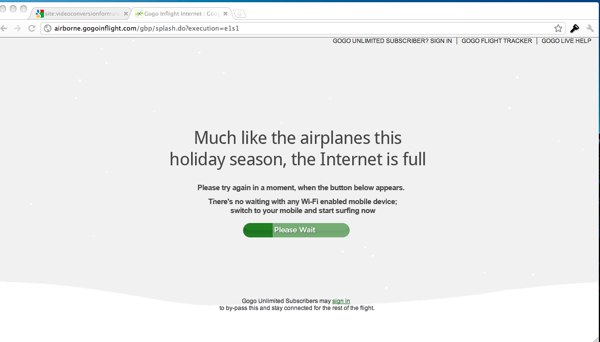 Hrmm, what the hell... OK, well that's understandable, right? I mean, it's free so they need to limit it. I will just pay for it (I also have a bunch of pre-paid GOGO inflight cards). HRMM, what's this... only people who are paying subscriptions can bypass the line. GREAT... But wait, what's this thing at the bottom about mobile devices?
 Ohh... ok... so I can't pay for daily access... or use any of my pre-paid cards... and I can't access the in-flight wifi unless I want to pay for a year subscription. That only leaves one option. We have to figure out how to trick the system into thinking my laptop is a mobile device.
Before I explain how I achieved this (easily), lemme point out how GOGO is making out like a bandit.
Ohh... ok... so I can't pay for daily access... or use any of my pre-paid cards... and I can't access the in-flight wifi unless I want to pay for a year subscription. That only leaves one option. We have to figure out how to trick the system into thinking my laptop is a mobile device.
Before I explain how I achieved this (easily), lemme point out how GOGO is making out like a bandit.
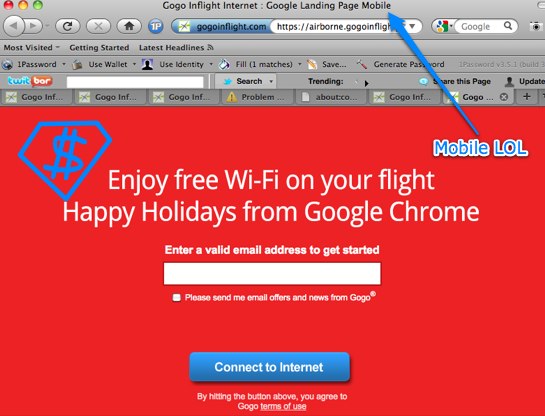
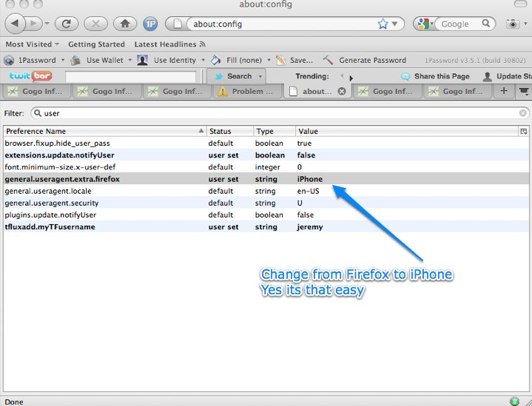 Then I went to google.com again... and it took me directly to entering my email to get started (like it did on my iPhone):
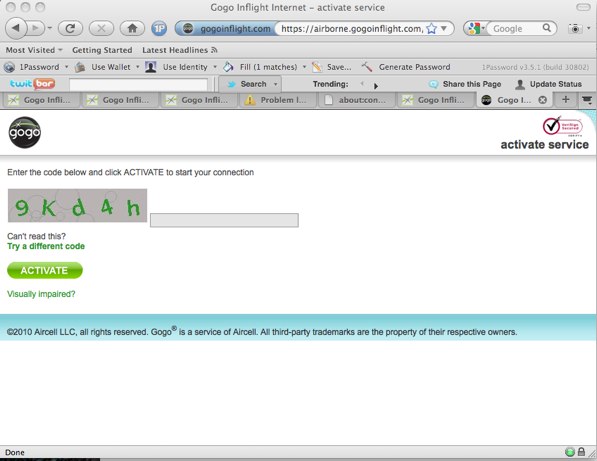 After the captcha page I was taken to the success page:
 Notice how it thinks I am using a mobile browser.... winnar!
Now I fire up Chrome and surf away:
Notice how it thinks I am using a mobile browser.... winnar!
Now I fire up Chrome and surf away:
 GREAT SUCCESS!
Ok, now we are landing. Sorry for typos... couple drinks on the plane.
GREAT SUCCESS!
Ok, now we are landing. Sorry for typos... couple drinks on the plane.
Hrmm, what the hell... OK, well that's understandable, right? I mean, it's free so they need to limit it. I will just pay for it (I also have a bunch of pre-paid GOGO inflight cards). HRMM, what's this... only people who are paying subscriptions can bypass the line. GREAT... But wait, what's this thing at the bottom about mobile devices?
Ohh... ok... so I can't pay for daily access... or use any of my pre-paid cards... and I can't access the in-flight wifi unless I want to pay for a year subscription. That only leaves one option. We have to figure out how to trick the system into thinking my laptop is a mobile device.
Before I explain how I achieved this (easily), lemme point out how GOGO is making out like a bandit.
- Google is paying a shit-ton to GOGO for presumably the same if not more then GOGO would normally bring in for *sponsoring* this service.
- The wifi is sponsored by Google Chrome... but only those on mobile devices can access it (and Chrome isn't available to them).
Then I went to google.com again... and it took me directly to entering my email to get started (like it did on my iPhone):
After the captcha page I was taken to the success page:
Notice how it thinks I am using a mobile browser.... winnar!
Now I fire up Chrome and surf away:
GREAT SUCCESS!
Ok, now we are landing. Sorry for typos... couple drinks on the plane.